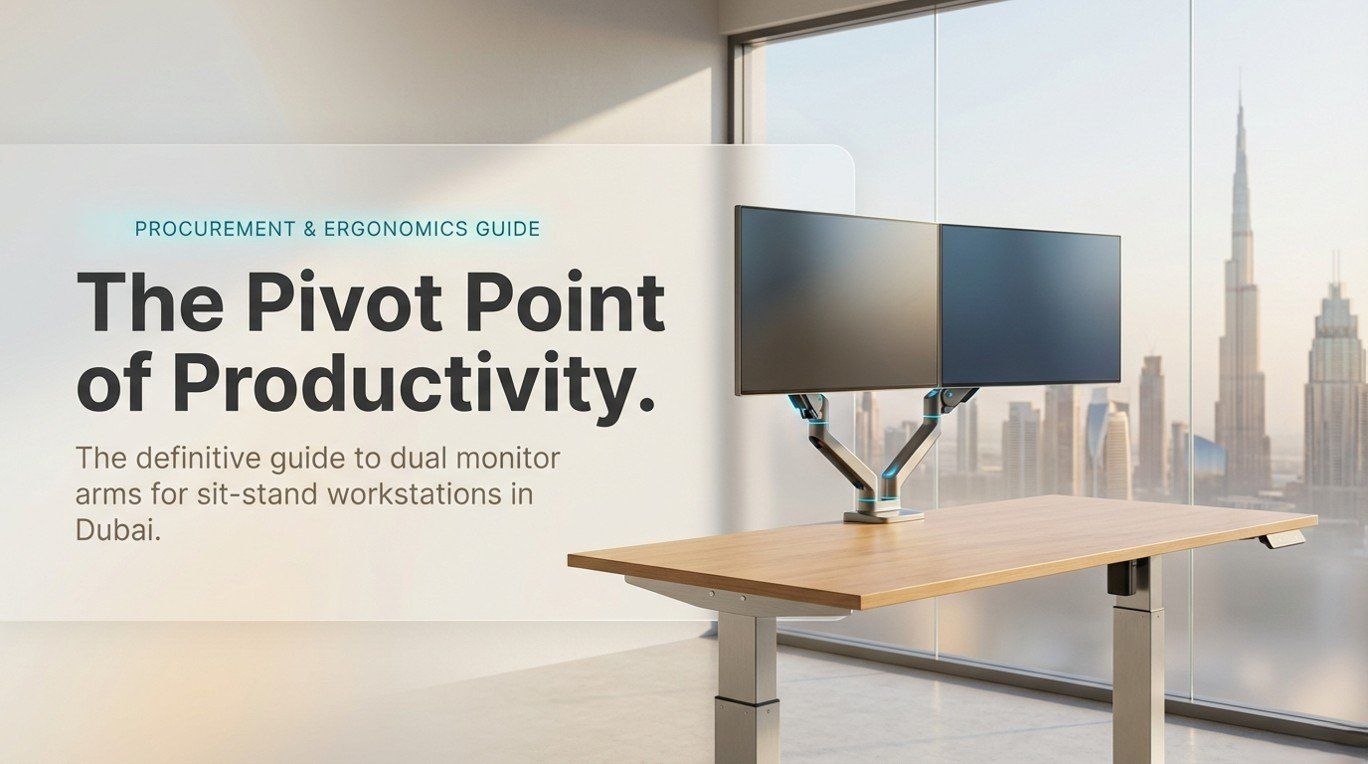
The modern Dubai office has undergone a seismic shift. Open-plan floors in DIFC, media-city hubs, and Business Bay towers are quietly retiring the fixed, single-screen workstation in favor of height-adjustable desks paired with floating dual monitors. This is not aesthetics it is evidence-based workplace design, and the pivot point of that design is the monitor arm. Choosing the wrong arm for a sit-stand desk does not just look untidy; it costs you the very ergonomic dividend the desk was bought to deliver.
This guide is the most comprehensive resource available in the UAE for anyone configuring a dual monitor setup on a sit-stand desk whether you are kitting out a corporate floor, a private office in Jumeirah, or a home studio in Dubai Hills. We cover every arm type, every mounting standard, weight and reach specifications, cable-routing best practices, ergonomic positioning science, AED pricing benchmarks, and a step-by-step installation protocol. We also compare leading solutions sold in the UAE market so that every dirham you invest is directed at a setup that genuinely performs.
1. Why a Dual Monitor Arm Transforms a Sit-Stand Desk
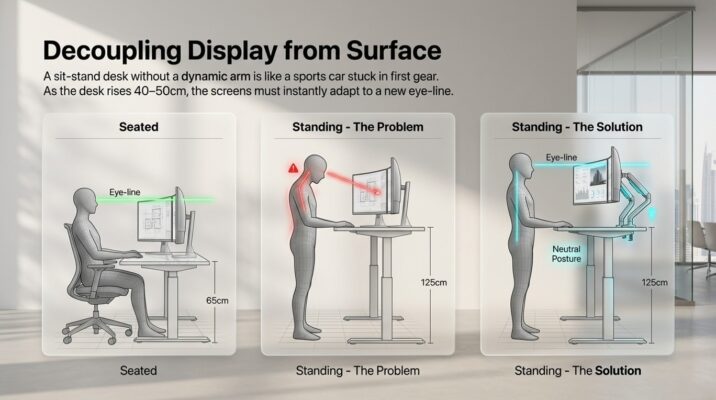
A sit-stand desk without a monitor arm is like a sports car driven only in first gear. The desk can transition between 65 cm (seated) and 125 cm (standing), but if both monitors are sitting on static risers, neither screen will be at the correct eye-line in either position. A dual monitor arm decouples the display from the desk surface, so as the desk rises, you re-position both screens in seconds maintaining the neutral neck posture that prevents the cervical strain endemic to open-plan offices.
1.1 The Productivity Case
A study cited by the British Journal of Ophthalmology found that dual-screen users complete complex tasks up to 44% faster than single-screen counterparts, and a Cornell University ergonomics lab report recorded a 10% productivity uplift just from correct monitor height. For a Dubai company with 50 knowledge workers, even a 5% productivity improvement at current UAE salary benchmarks represents a six-figure annual gain. The investment in a quality dual monitor arm Dubai office workers need is recovered within weeks, not years.
1.2 Health and Compliance Drivers
The UAE’s Ministry of Human Resources and Emiratization (MOHRE) increasingly references ISO 9241 ergonomic standards in workplace guidance. Properly positioned monitors reduce musculoskeletal complaints the top driver of employee sick-leave in sedentary office roles. Pair a compliant ergonomic workstation UAE setup with a sit-stand desk and the dual monitor arm becomes a measurable health intervention, not merely a gadget.
2. Types of Dual Monitor Arms — A Complete Classification
Not all monitor arms are engineered equally, and the wrong choice for a sit-stand environment is almost as problematic as no arm at all. Below is a detailed breakdown of every arm type commercially available in the UAE market.
| Arm Type | Range of Motion | Weight Limit | Gas/Mechanical | Desk Mount | Best For |
|---|---|---|---|---|---|
| Single Fixed Arm | Tilt / Pan | Up to 8 kg | Mechanical | Clamp / Grommet | Entry-level setups |
| Single Gas-Spring | Full 3-axis | Up to 10 kg | Gas Spring | Clamp / Grommet | Frequent adjusters |
| Dual Stacked Arm | Full 3-axis ×2 | Up to 8 kg each | Gas Spring | Single grommet | Sit-stand desks |
| Dual Side-by-Side | Full 3-axis ×2 | Up to 9 kg each | Gas / Mechanical | Clamp / Grommet | Ultra-wide workflows |
| Laptop + Monitor | Dual level | Laptop ≤ 5 kg | Gas Spring | Clamp | Hybrid workers |
| Ultrawide Single | Tilt / Pan / Swivel | Up to 15 kg | Mechanical + Gas | Grommet preferred | Creative/trading desks |
Monitor arm types compared across key specification dimensions. Pricing and availability reflect the UAE market, 2025.

2.1 Single Mechanical Arm
The single mechanical arm is the entry point of the category. It uses friction-based pivot joints typically tensioned with a hex key to hold a monitor at a fixed angle. Weight limits range from 5 kg to 8 kg, making them unsuitable for displays larger than 27 inches. The fundamental limitation for sit-stand use is that every desk-height change requires manual repositioning of the arm’s pivot joints, which defeats the purpose of rapid height transitions.
2.2 Single Gas-Spring Arm
The gas-spring mechanism is the workhorse of the contemporary ergonomic workstation UAE specification. An internal nitrogen cylinder provides counterbalanced support, allowing the monitor to float and be repositioned with one hand using a few hundred grams of force. Quality gas-spring arms self-adjust across a 15–30 cm vertical travel range, meaning a moderate desk-height change may require no arm adjustment at all the screen simply floats at the correct position.
2.3 Dual Stacked (Vertical) Arm
The dual stacked arm mounts two monitors on a single pole one above the other. This is the preferred configuration for sit-stand desks in Dubai offices with limited lateral space. The vertical stack maintains both screens within a narrow footprint, reduces desk clutter, and typically uses a single grommet or clamp mount, leaving the full desk surface free. Gas-spring versions allow simultaneous repositioning as the desk height changes.
2.4 Dual Side-by-Side Arm
Side-by-side dual arms share a central post and extend two horizontal booms left and right. This format suits workflows requiring panoramic viewing, such as financial trading desks, video editing suites, and engineering design stations common in Dubai’s expanding technology sector. The lateral reach of each arm (typically 380–500 mm) allows independent pan, tilt, and swivel adjustment, enabling users to create angled configurations that mirror human binocular vision.
2.5 Laptop + Monitor Combination Arm
The hybrid arm addresses Dubai’s growing population of remote-first and hot-desk workers. A lower tray accepts a laptop (up to 5 kg, 15.6-inch maximum on most models), while an upper arm carries an external monitor. This setup eliminates the need for a laptop stand while keeping the adjustable monitor stand UAE specification intact for the primary display.
3. VESA Standards — The Compatibility Backbone
VESA (Video Electronics Standards Association) mount patterns are the universal language of monitor mounting. Before specifying any dual monitor arm Dubai procurement, confirming VESA compatibility is non-negotiable.
3.1 Common VESA Patterns
- 75×75 mm — found on smaller monitors (22 inches and below)
- 100×100 mm — the most common; covers 24–32 inch monitors
- 200×100 mm — used on some ultrawide and curved panels
- 200×200 mm — found on large displays (34 inches and above)
- 400×200 mm — very large curved monitors (40 inches+)
The critical rule: the arm’s mount interface must match the monitor’s VESA pattern exactly, or an adapter plate must be used. Adapters are available in Dubai from most office accessories UAE suppliers and typically cost AED 30–80.
3.2 Non-VESA Monitors
Some premium monitors (notably from Apple, Microsoft Surface Studio, and certain LG designs) ship without VESA mounts. Universal adapter kits exist that clamp around the monitor’s bezel, but these are heavier and less stable. For a dual-arm sit-stand setup in a professional Dubai office, we strongly recommend specifying VESA-compatible displays from the outset.
4. Weight Capacity — Getting the Specifications Right
Weight rating is the most commonly misread specification in office desk setup Dubai purchases. The number printed on a dual arm’s box refers to the maximum per arm, not the total combined load. A dual arm rated at ‘9 kg’ supports up to 9 kg on each arm 18 kg total. Exceeding this specification causes gas cylinders to drift over time and mechanical joints to slip, compromising both ergonomics and screen safety.
| Brand / Model | Max Weight (kg) | VESA Compatibility | Arm Reach (mm) | Est. Price (AED) |
|---|---|---|---|---|
| Ergotron LX Dual | 11.3 kg / arm | 75×75 – 100×100 | 432 | 650 – 750 |
| Flexi mounts D1D | 9 kg / arm | 75×75 – 100×100 | 380 | 320 – 420 |
| Amazon Basics Dual | 8 kg / arm | 75×75 – 100×100 | 360 | 250 – 320 |
| North Bayou F160 | 9 kg / arm | 75×75 – 100×100 | 404 | 280 – 360 |
| Vivo Dual Gas | 9 kg / arm | 75×75 – 100×100 | 410 | 290 – 380 |
| Office Master Pro Desk Mount Dual Monitor Arm |
10 kg / arm | 75×75 – 100×100 | 430 | 340 – 515 |
Weight capacity and pricing benchmarks for leading dual monitor arm models available in the UAE. Prices are indicative (AED) and may vary by retailer.

4.1 How to Weigh Your Monitor Accurately
The manufacturer’s published weight for a monitor typically includes the stand. Removing the stand reduces the weight by 0.5–1.5 kg for most panels. Use the panel-only weight (sometimes listed separately in the spec sheet as ‘without stand’) when selecting an arm. If in doubt, err toward an arm with a higher weight rating gas springs last longer when operating at 70–80% of their rated capacity.

5. Desk Mounting Options — Clamp vs Grommet
The junction between arm and desk is a decision point that many buyers overlook until after purchase. The two dominant mounting methods desk clamp and grommet each have specific suitability for different sit stand desk accessories Dubai configurations.
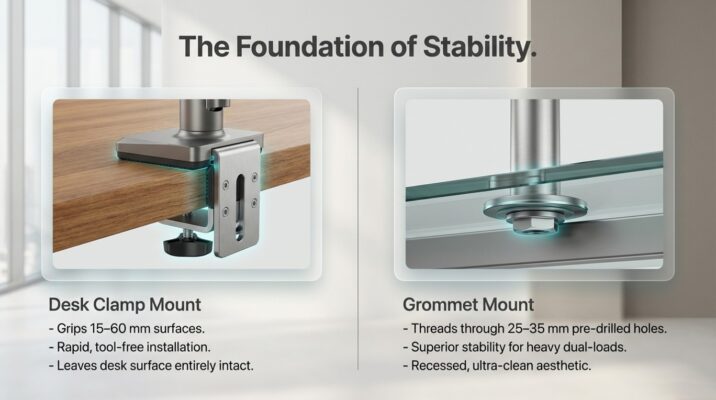
5.1 Desk Clamp Mount
A C-clamp body grips the desk edge from above and below, tightened via a threaded rod. Installation requires no drilling and takes under five minutes. Clamps work on surfaces between 15 mm and 60 mm thick check your sit-stand desk manufacturer’s edge specification. Clamps can scratch finished or coated edges if a protective pad is not used, so look for models with rubber-lined jaws. The main limitation is desk-edge space: two side-by-side dual arms each require approximately 80 mm of edge space.
5.2 Grommet Mount
A grommet mount threads through a pre-drilled hole in the desktop (typically 25–35 mm diameter), secured by a washer and nut from underneath. This delivers superior stability particularly important for heavy dual-arm configurations on glass or thin composite surfaces and results in a cleaner finish because the mounting hardware is recessed below the desk plane. Most premium sit-stand desks sold in Dubai include at least one grommet hole as standard.
5.3 Wall Mount
Wall-mounted dual arms remove load from the desk entirely and offer the maximum reach and positioning freedom. They are ideal for permanent workstation installations in corporate environments. Wall mounting in Dubai requires attention to wall substrate gypsum partition walls need steel backing plates to achieve the load ratings dual monitors demand.
| Desk Type | Clamp Mount | Grommet Mount | Recommended Arm Style | Notes |
|---|---|---|---|---|
| Electric Sit-Stand Desk | ✓ Excellent | ✓ Excellent | Dual Gas-Spring | Ensure surface ≥ 25 mm thick |
| Manual Crank Desk | ✓ Good | ✓ Good | Dual Mechanical | Lighter arm reduces crank effort |
| Fixed Height Desk | ✓ Good | ✓ Good | Single or Dual | Gas-spring adds lost height flex |
| L-Shaped Desk | ✓ Good | ✓ Good | Dual Side-by-Side | Corner mount maximizes reach |
| Glass-Top Desk | ✗ Not suitable | ✓ With adapter | Grommet-only dual arm | Risk of cracking with clamps |
| Standing Desk Pod | ✓ Excellent | Limited | Compact dual clamp | Check pod edge thickness |
Desk compatibility chart by surface type and recommended mounting configuration for UAE office environments.
6. Ergonomics and Posture Optimization
Purchasing a dual monitor arm Dubai office supply is only the beginning. The ergonomic dividend is unlocked through precise positioning and the human body’s optimal display geometry is well-documented by bodies including OSHA, NIOSH, and the European Agency for Safety and Health at Work.
6.1 Monitor Height
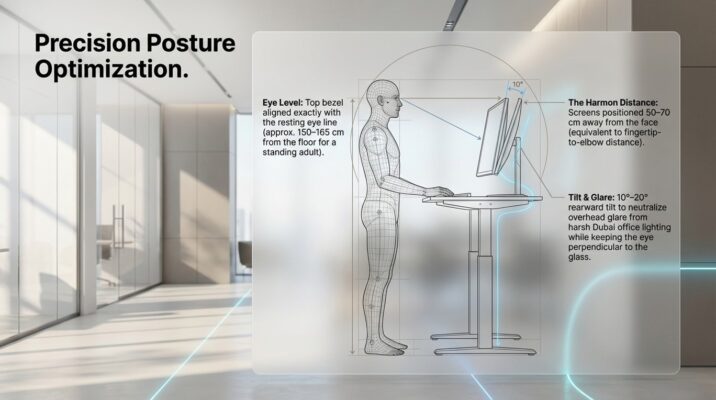
The top of the monitor bezel should align with, or be slightly below, the user’s resting eye level. This keeps the cervical spine in a neutral, slightly forward-tilted posture rather than the upward crane that causes trapezius and levator scapulae strain. For dual stacked configurations, the primary monitor (used most frequently) occupies this position, with the secondary monitor set slightly lower or offset to the side.
| User Height | Sitting Eye Level | Sit-Stand Eye Level | Monitor Distance | Tilt Angle |
|---|---|---|---|---|
| 155 – 163 cm | 95 – 102 cm | 140 – 148 cm | 50 – 60 cm | 10° – 15° back |
| 163 – 170 cm | 100 – 108 cm | 148 – 155 cm | 55 – 65 cm | 10° – 15° back |
| 170 – 178 cm | 105 – 113 cm | 152 – 162 cm | 55 – 70 cm | 10° – 20° back |
| 178 – 185 cm | 110 – 118 cm | 158 – 168 cm | 60 – 70 cm | 15° – 20° back |
| 185 – 193 cm | 115 – 123 cm | 165 – 175 cm | 60 – 75 cm | 15° – 20° back |
Ergonomic monitor height guidelines by user height for both seated and standing desk positions. Measurements from floor to center of screen.
6.2 Monitor Distance
The Harmon Distance popularized by vision researchers places monitors at approximately the same distance as the user’s elbow to fingertip (roughly 50–70 cm for most adults). Gas-spring arms with 400–450 mm of reach allow this distance to be set precisely rather than approximated by stacking books or boxes. For dual side-by-side configurations, angling each monitor 15–30° inward eliminates the lateral neck rotation that causes chronic cervical pain.
6.3 Tilt and Swivel Angles
A slight rearward tilt (10°–20°) reduces reflective glare from Dubai’s abundant natural and artificial lighting while keeping the eye perpendicular to the screen surface. Independent swivel of each arm in a dual configuration allows the monitors to be rotated to portrait orientation for long-document and coding workflows a feature particularly valued by software developers in Dubai Internet City and media professionals in Dubai Studio City.
6.4 The Sit-Stand Transition Protocol
When transitioning from seated to standing, the desk surface height increases by approximately 40–50 cm for most users. A quality gas-spring dual arm automatically compensates for roughly 15–20 cm of this change through its spring tension. For the remaining distance, a single upward press of the arm’s main joint requiring no tools repositions both screens. Build this two-second adjustment into the transition habit and the ergonomic chain remains unbroken in both positions.
7. Cable Management — The Hidden Quality Indicator
Cable management is the differentiator between a professional workstation ergonomics Dubai showcase and a tangle of HDMI, DisplayPort, and USB-C cables that undermine every aesthetic and safety benefit the arm delivers.
7.1 Integrated Cable Routing
Premium dual arms including the Ergotron LX series and Office Master Pro route cables internally through hollow arm sections from monitor connection point to desk mount. This eliminates external cable exposure entirely and prevents cables from binding during arm articulation. Assess the internal routing capacity: most arms accommodate up to two display cables and one USB cable simultaneously.
7.2 Cable Clips and Spine Covers
Mid-range arms use external cable management clips or spine covers C-shaped channels that snap around bundled cables along the arm’s exterior. These are effective when properly installed and are easier to modify when changing monitors. Look for clip systems that release without tools to simplify future cable changes.
7.3 Desk-Level Cable Management
The arm handles the cable run from monitor to desk edge, but a complete office accessories UAE solution extends this discipline under the desk surface. Cable trays, conduit raceways, and magnetic cable anchors direct power, display, and peripheral cables to a single exit point typically the desk’s cable port or grommet before descending to floor-level power distribution. This is especially important for sit-stand desks, where a moving desk surface requires a cable drape or coiled strain relief rather than taut, fixed routing.

8. Expert Buying Guide — Choosing the Right Dual Monitor Arm in Dubai
With dozens of SKUs available across UAE retailers from global e-commerce platforms to specialist office furniture Dubai showrooms the selection process benefits from a structured decision framework.
8.1 Step 1 — Audit Your Monitors
Before browsing a single product listing, compile the following data for each monitor: display size (inches), VESA pattern (check the back of the panel or the spec sheet), weight without stand (in kilograms), and panel depth at the VESA mount point. This 60-second audit eliminates 80% of incompatible arms before a purchase decision is made.
8.2 Step 2 — Assess Your Desk
Measure the desk’s edge thickness at the intended clamp location and confirm whether a grommet hole is present and its diameter. For electric sit-stand desks, check the underside for cable trays or reinforcement brackets that may limit where a grommet mount can be positioned. Note the desk’s rated surface load adding two 8 kg monitors to a desk via arms changes the load distribution, though most quality sit-stand desks accommodate this without issue.
8.3 Step 3 — Define Your Workflow
A financial analyst in DIFC who runs 12 simultaneous application windows has different requirements to a content designer who needs portrait-orientation reference screens. The workflow dictates the arm configuration: stacked vertical for constrained spaces, side-by-side for panoramic workflows, laptop-plus-monitor hybrid for travel-heavy roles. A workstation ergonomics Dubai consultant can assess this in a site visit, but the decision tree above provides a strong starting point.
8.4 Step 4 — Set a Realistic Budget
Quality dual monitor arms in the UAE market range from AED 250 for entry-level mechanical units to AED 850 for premium gas-spring configurations with integrated cable management and tool-free adjustment. The sweet spot for a professional office desk setup Dubai sits between AED 350 and AED 550, where build quality, weight capacity, and cable routing all meet commercial-grade standards. Avoid sub-AED 200 arms for sit-stand applications — the gas cylinders in budget units often lose tension within 12 months of daily height adjustments.
8.5 Step 5 — Verify After-Sales Support
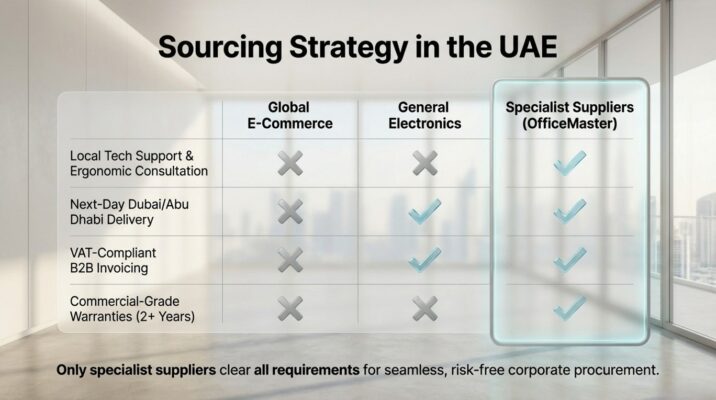
Monitor arms are mechanical assemblies subject to wear. A UAE-based supplier with local stock, a published warranty (minimum two years for commercial environments), and an accessible support channel is worth a modest price premium over a grey-market import with no recourse. OfficeMaster.ae provides full product warranties, local technical support, and next-business-day delivery across Dubai and Abu Dhabi.

9. Step-by-Step Installation Guide
The following protocol covers a dual gas-spring arm with clamp mount on an electric sit-stand desk the most common configuration for UAE corporate offices.
Tools Required
- Hex key set (typically 3 mm, 4 mm, and 5 mm)
- Adjustable spanner or 13 mm open-ended wrench
- Soft cloth or foam pad (to protect desk edge)
- Cable ties or arm-compatible cable clips
- Spirit level (optional but recommended for dual side-by-side)
9.1 Prepare the Desk
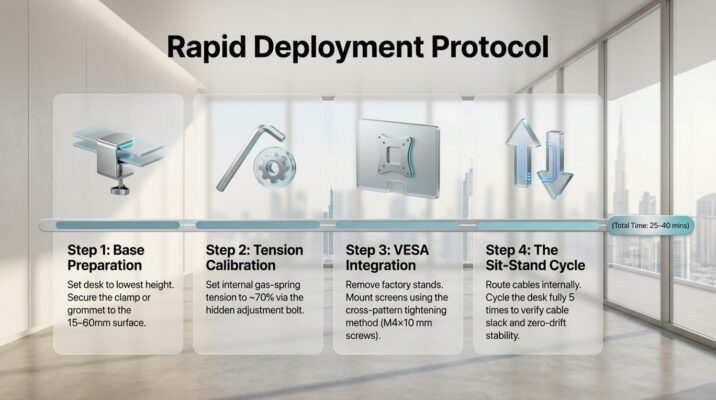
Set the desk to its lowest height (seated position). This gives maximum access to the underside and reduces the risk of the arm swinging into obstacles during installation. Clear a 50 cm radius around the mounting point.
9.2 Attach the Mount
Place the protective pad on the desk edge. Position the clamp body so the upper jaw sits flush with the desk surface and the lower jaw grips the underside. Thread the tension bolt and tighten with a spanner until snug firm enough to prevent rotation under 10 kg of lateral force, but not so tight as to compress laminate or veneer finishes. For grommet mounts, thread the pole through the grommet hole, fit the base plate and washer from beneath, and tighten the locking nut.
9.3 Set Gas-Spring Tension
Attach the arm’s main body to the pole (clamp) or base (grommet). Before mounting the monitor, set the gas-spring tension to approximately 70% of rated maximum using the tension adjustment bolt typically located beneath the spring housing, accessible via a 4 mm hex key. This provides headroom for fine-tuning once the monitor is attached.
9.4 Remove Monitor Stands
Lay each monitor face-down on a soft surface. Locate the VESA screws (usually under a cover plate) and remove them. Lift the stand assembly away cleanly, storing the original stand and screws for resale or warranty purposes.
9.5 Mount the Monitors
Align the arm’s VESA adapter plate with the monitor’s four threaded holes. Use the VESA screws supplied with the arm (verify the thread pitch and length match M4×10 mm is standard for 100×100 VESA). Tighten in a cross pattern to ensure even clamping. Attach the first monitor to the upper arm, the second to the lower arm (for stacked configuration), and gently release.
9.6 Fine-Tune and Route Cables
Raise the desk to standing height and adjust each arm’s gas-spring tension, tilt, pan, and swivel until both screens align with eye level at the correct distance. Return to seated height and verify the positions remain ergonomically correct. Route display cables and USB connections through the arm’s cable management channels, securing with clips at each articulation point to prevent binding. Use a strain-relief anchor at the desk surface to accommodate the moving desk travel.
9.7 Final Check
Cycle the desk through five full sit-stand transitions, verifying that cables have adequate slack at the maximum extended height, that neither arm drifts from its set position, and that both monitors maintain their orientation. Tighten any pivot joints that show movement. The complete installation from unboxing to final check typically takes 25–40 minutes for an experienced user.
10. Competitor Comparison — UAE Market Analysis
Dubai’s office accessories UAE retail landscape has expanded significantly since 2022. Buyers can source dual monitor arms from global e-commerce platforms, local distributors, and specialist office furniture Dubai showrooms. Understanding the relative strengths of each channel informs a more confident purchasing decision.
10.1 Global E-Commerce Platforms
Platforms shipping to Dubai offer a wide SKU range but inconsistent quality control, no local technical support, variable import duty exposure, and delivery windows of 7–21 days. Returns logistics for bulky items (monitor arms average 4–6 kg packaged) are complex and often impractical. For corporate procurement with volume requirements, the absence of a UAE VAT-compliant invoice source creates accounting complications.
10.2 General Electronics Retailers
Large format electronics retailers in Dubai carry a limited range of consumer-grade monitor arms, typically positioned in the peripherals aisle without ergonomic advisory support. Staff product knowledge varies widely, after-sales service for B2B clients is non-specialist, and pricing is often retail-marked without volume discount structures.
10.3 Specialist Office Furniture Suppliers
Suppliers focused exclusively on office furniture Dubai and workspace accessories offer a fundamentally different value proposition. OfficeMaster.ae exemplifies this model curating a range of dual monitor arms tested against Dubai’s specific office environment requirements (humidity tolerance, voltage compatibility, delivery within UAE), providing pre-sales ergonomic consultation, and supporting procurement with volume pricing, VAT-compliant invoicing, and installation coordination. For businesses investing in a complete ergonomic workstation UAE upgrade across multiple seats, this channel delivers consistently superior outcomes.
11. Productivity Benefits — The Business Case for Dubai Offices
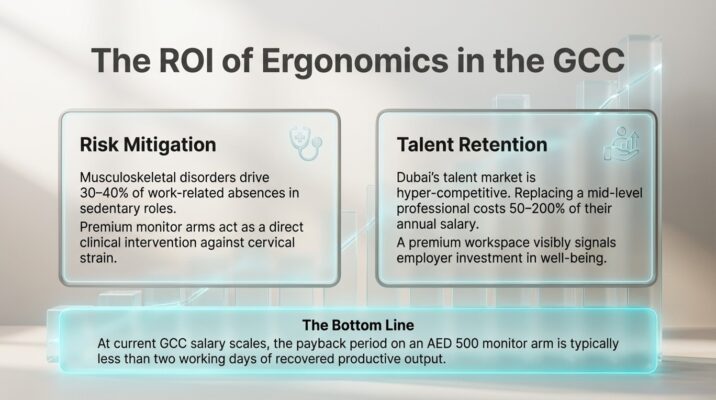
Ergonomic investment returns are measurable. A 2023 analysis by the International Facility Management Association (IFMA) found that well-configured dual-monitor workstations reduced task-switching time by 18% and error rates on data-entry tasks by 33%. For a UAE business operating at GCC salary scales, the payback period on a AED 500 monitor arm is typically less than two working days of recovered productive output.
11.1 Reduced Absenteeism
Musculoskeletal disorders account for an estimated 30–40% of work-related absences in sedentary office roles. A correctly configured adjustable monitor stand UAE setup combined with a sit-stand desk reduces the incidence of neck and shoulder complaints the two most common sources of office-related short-term absence by a clinically documented margin. Reduced absenteeism is a direct P&L benefit that finance directors and HR teams can quantify.
11.2 Talent Attraction and Retention
Dubai’s talent market is globally competitive, with knowledge workers increasingly evaluating workspace quality as part of their employment decision. A thoughtfully designed ergonomic workstation UAE office featuring height-adjustable desks, floating dual monitors, and integrated cable management signals employer investment in employee wellbeing. This is a soft benefit with hard outcomes: the Society for Human Resource Management (SHRM) estimates that replacing a mid-level professional costs 50–200% of annual salary.
Frequently Asked Questions
The best arm balances gas-spring technology, per-arm weight capacity above your monitor weight, integrated cable routing, and a reputable UAE after-sales channel. Gas-spring dual arms from OfficeMaster.ae in the AED 350–550 range represent the optimal value-quality intersection for most professional sit-stand desk users in Dubai.
Most sit-stand desks accept clamp or grommet mounting, but confirm the desk edge thickness (clamps typically require 15–60 mm) and that the desk surface is rated for the combined arm and monitor load. Glass-top desks require grommet mounting with a protective washer.
Q: What VESA pattern do most office monitors use?
The vast majority of office-grade monitors (24–32 inches) use a 100×100 mm VESA pattern. Check the back of your monitor or the manufacturer’s specification sheet before purchasing an arm.
Q: How much weight can a dual monitor arm hold?
Weight ratings vary by model. Most quality dual arms sold in the UAE support between 8 kg and 11 kg per arm. Always match the arm’s per-arm rating to your individual monitor’s weight (without stand), not the total of both monitors.
Q: Is a gas-spring arm better than a mechanical arm for a sit-stand desk?
Yes, for sit-stand applications. A gas-spring arm allows one-hand repositioning in under two seconds — critical for the multiple daily sit-stand transitions that deliver the health benefits the desk is designed to provide. Mechanical arms require hex-key adjustment for every height change.
Q: How do I route cables cleanly with a dual monitor arm?
Choose an arm with internal or spine-mounted cable channels. Route display cables from each monitor along the arm, securing at each pivot point. Use a strain-relief clip at the desk surface to provide slack for the desk’s vertical travel, and continue cable management under the desk with a cable tray to the power and data source.
Q: What is the correct monitor height for a standing desk user?
The top of the monitor bezel should align with or sit slightly below eye level when standing. Refer to Table 4 above for height-specific ergonomic guidelines. As a general rule, standing eye level is approximately 8–10 cm lower than standing height for most adults.
Q: Can I mount two different size monitors on a dual arm?
Yes, provided both monitors meet the arm’s VESA compatibility and weight capacity requirements. Adjust each arm independently for height, tilt, and distance to compensate for the difference in screen size. Larger monitors typically require a slightly lower mount position to keep the center of the panel at eye level.
OfficeMaster.ae stocks a full range of dual monitor arms for UAE delivery, with next-business-day dispatch to Dubai and Abu Dhabi addresses. Specialist office furniture Dubai showrooms offer the additional benefit of pre-purchase ergonomic consultancy.
Q: How long does it take to install a dual monitor arm?
A dual gas-spring arm installation — including monitor removal, arm assembly, and cable routing — takes 25–40 minutes for a first-time installer following a structured guide. Subsequent installations average 15–20 minutes.
Q: Are dual monitor arms compatible with ultrawide curved monitors?
Many dual arms support ultrawide monitors (34 inches) with appropriate VESA patterns (typically 100×100 or 200×100 mm) if the panel weight is within the arm’s rated capacity. Single arms with higher weight ratings (12–15 kg) are often better suited to large curved panels than dual-arm configurations.
Q: What is the difference between a clamp mount and a grommet mount?
A clamp mount grips the desk edge without drilling; a grommet mount threads through a pre-drilled hole. Grommet mounts provide greater stability and a cleaner finish, making them the preferred choice for premium office environments and glass-top desks. Clamp mounts offer faster installation and portability.
Any desk with a solid surface at least 15 mm thick and a stable edge or grommet hole is compatible with a dual monitor arm. Height-adjustable sit-stand desks pair most effectively with gas-spring arms for continuous ergonomic optimization.
Q: What are the key ergonomic benefits of a dual monitor arm?
A dual monitor arm enables independent height, distance, tilt, and rotation adjustment for each display — placing both screens precisely within the ergonomic neutral zone. This reduces neck flexion, shoulder elevation, eye fatigue, and wrist strain compared to static desk-based risers or factory monitor stands.
Q: How do I choose between a stacked and side-by-side dual arm configuration?
Choose a stacked (vertical) configuration when desk width is limited or when the secondary monitor is used infrequently (e.g., for reference documents or dashboards). Choose a side-by-side configuration when both screens are used continuously and workflow requires lateral screen scanning, such as in trading, design, or project management roles.
Ready to Transform Your Dubai Workstation? — OfficeMaster.ae
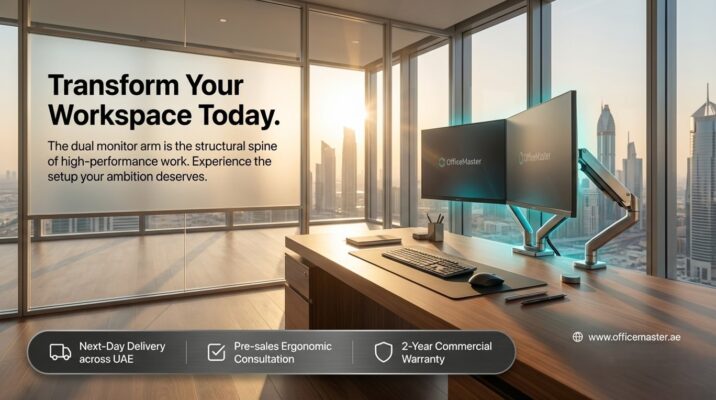
A dual monitor arm is not a peripheral accessory. It is the structural spine of a high-performance ergonomic workstation and in Dubai’s competitive, talent-driven office landscape, it is an investment that pays dividends in productivity, employee wellbeing, and workspace aesthetics from day one.
OfficeMaster.ae is the UAE’s specialist in office furniture and workspace solutions curating only the products that meet the specific demands of Dubai’s dynamic office environment. From dual gas-spring arms to complete ergonomic workstation UAE packages, our product range is backed by pre-sales consultation, next-business-day Dubai delivery, VAT-compliant invoicing, and a minimum two-year warranty on all mounting systems.